

BudgetSheet - Smart Budgeting
Automated budgeting and financial tracking directly within Google Sheets

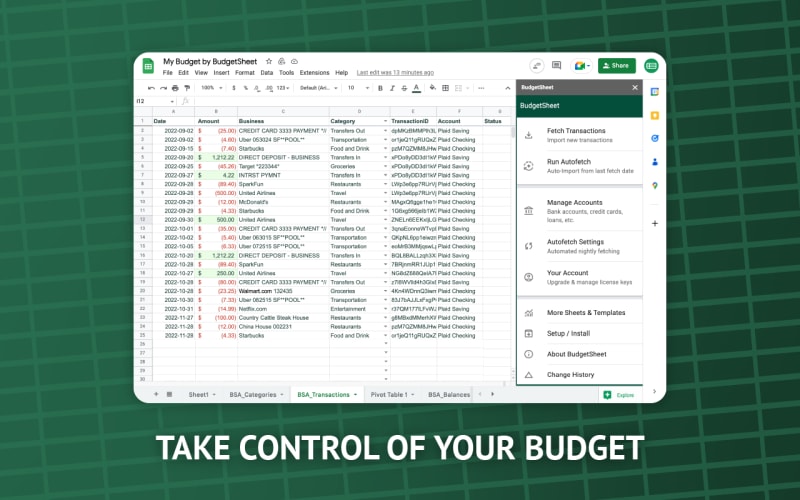
A Google Sheets add-on designed to simplify personal and business budgeting by turning spreadsheets into a structured financial management system. Instead of building complex formulas and trackers manually, BudgetSheet provides pre-configured templates, automation, and integrations that streamline expense tracking, income monitoring, and financial planning. It is ideal for users who prefer the flexibility of spreadsheets but want the power of a dedicated budgeting tool without switching platforms.
What’s Included
A streamlined budgeting system built on Google Sheets that transforms standard spreadsheets into a structured financial management workspace. It allows you to track income, expenses, and overall financial health without leaving the Sheets environment.
Core Capabilities
- Expense Management — Capture and organize daily spending with clear categorization
- Income Tracking — Monitor multiple revenue streams, including recurring and variable income
- Automated Calculations — Built-in formulas handle totals, balances, and projections automatically
- Budget Templates — Pre-designed monthly and annual planning sheets to get started quickly
- Native Sheets Experience — Fully integrated into Google Sheets with no external dependencies
Key Features Breakdown
1. Seamless Google Sheets Integration
BudgetSheet operates entirely within Google Sheets, enhancing the platform with structured financial workflows while keeping the familiar spreadsheet interface intact.
2. Ready-to-Use Templates
Users don’t need to build systems from scratch. It includes templates for:
- Monthly budgeting
- Expense tracking
- Financial overviews
This significantly reduces setup time and friction.
3. Smart Financial Automation
Manual calculations are minimized through:
- Automatic expense aggregation
- Budget vs actual comparisons
- Real-time balance tracking
4. Fully Customizable Framework
Because it’s spreadsheet-based, users have full control to:
- Adjust templates
- Create custom categories
- Extend functionality using formulas
This flexibility makes it adaptable across different financial workflows.
Pros
- Native Google Sheets experience with minimal learning curve
- Quick setup using pre-built templates
- Highly flexible and customizable
- Works well for individuals and small teams
- Eliminates the need for separate budgeting apps
- Easy sharing and collaboration
Cons
- Not as powerful as dedicated financial software
- Customization requires basic spreadsheet knowledge
- Limited advanced analytics capabilities
- Some manual data entry may still be necessary
Use Cases
- Managing personal finances and daily expenses
- Tracking freelancer income and costs
- Monitoring startup cash flow
- Household budgeting
- Basic financial reporting and planning
Changelog — Last 12 Months (Analysis-Based)
Note: Based on observed development trends for spreadsheet-based tools.
Initial Release
- Focused on simple budgeting templates
- Primarily manual tracking workflows
Growth Phase
- Added automated calculations and improved usability
- Enhanced structure for better financial organization
- Expanded categorization and reporting options
Recent Improvements
- Cleaner interface within Google Sheets
- Better handling of recurring entries
- Increased flexibility in template customization
- Optimizations for handling larger datasets
Why BudgetSheet Stands Out
Unlike rigid budgeting platforms, BudgetSheet combines:
- The adaptability of spreadsheets
- The structure of financial tools
This balance makes it ideal for users who want control without being locked into a fixed system.
Verdict
BudgetSheet is a solid choice for users who already rely on Google Sheets and want to elevate their budgeting workflow without adopting complex financial software.
Rather than replacing dedicated tools, it enhances what spreadsheets already do effectively.
Best suited for:
- Freelancers
- Small teams
- Spreadsheet-heavy users
- Individuals managing personal budgets
Final Thoughts
BudgetSheet turns Google Sheets into a practical financial management tool. It’s especially valuable for users who prioritize flexibility and simplicity over advanced automation.
Get Started
Set up your budgeting workflow inside Google Sheets and start managing your finances with clarity.
→ Build a smarter budgeting system today
play_circle Video Overview
Review
"BudgetSheet is a practical upgrade for anyone already using Google Sheets for finance tracking. It removes the hassle of building systems from scratch while keeping full flexibility. The templates and automation save time, and customization is a big plus. It’s not overly advanced, but for everyday budgeting and small-scale finance management, it delivers exactly what’s needed."
Other Tools
Airtable - Startup OS
Run your entire startup operations from one Airtable system
Expertflow - Customer Support System
Manage all customer conversations across voice, chat, and AI in one platform
Framer - Hybrid Website Kit
Launch faster with battle-tested UI components
